


Hulu for Android TV
2.52.96K Reviews
App Specs
- Version
- C59F39CFP3.10.33
- Updated On
- License
- Free
- Downloads
- 10,000,000+
- Developer
- Disney
- Categories
- Entertainment
- Platform
- Android
Screenshots
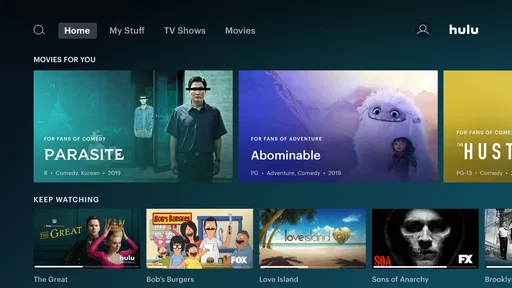
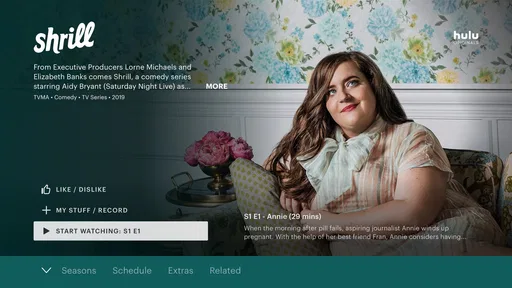
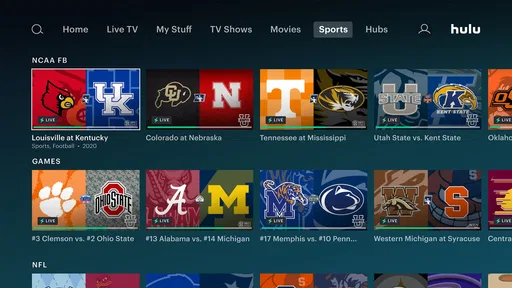
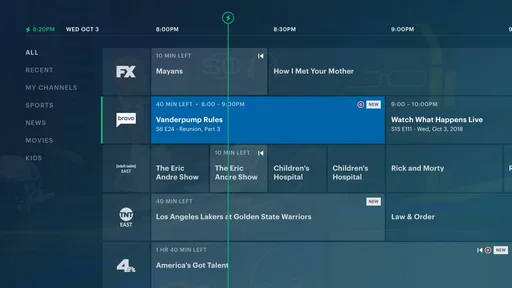
 Analysis by AppCompare
When I choose a streaming app for the living-room screen, I look beyond the size of the library: I want to know what I can actually watch, how easily I can find it with a remote, and whether the cost makes sense for my household. Hulu for Android TV is Disney’s entertainment app, and its appeal is the mix of series, films and Hulu Originals in one place. The app itself is free to install, but that should not be confused with free access to everything it offers; the subscription choices determine the viewing value.
What the free download does—and does not—tell you
Hulu is listed as free, which makes trying the app itself a low-commitment first step. That price describes the download, not a promise that the full catalogue is available without a subscription. Before building your evening routine around it, I’d check the plan options shown in the app or store for your location and consider whether the titles you want justify the ongoing cost. I wouldn’t treat a free install as a free streaming service.
That distinction matters particularly on a shared television. Someone browsing casually may assume they can start any programme they see, while a household member who has already chosen a subscription may be thinking about a particular show or live-TV option. I’d settle that expectation first: decide who is paying, what kind of viewing matters, and whether the available plan suits the people who will use the screen. The app is a doorway; the value depends on what your household chooses to access through it.
Where the viewing value comes from
For me, the strongest reason to consider Hulu is the combination of familiar television viewing and exclusive originals. If you already have a few series in mind, the app can be a convenient place to look for them alongside films and other shows. Its entertainment focus is broader than a single-programme destination, but the real value is personal: a deep-looking catalogue is only useful when it contains things you actually want to watch.
Hulu is developed by Disney and sits in a crowded streaming landscape, so I’d compare it with the services you already use rather than adding it just because it is available on Android TV. A general film-and-series service may be a better fit if its catalogue matches your tastes more closely. A live-TV-focused option may suit you better if channels are the main reason you stream. Hulu makes most sense when its particular programmes and mix of viewing styles fill a gap, rather than when you simply want another app on the home screen.
One practical way to judge that fit is to make a short watchlist before subscribing: write down the series, films or kinds of programming you would genuinely choose this month, then check whether Hulu is the convenient home for them. This prevents a common streaming mistake—paying for a service because it sounds useful, then spending more time browsing than watching. If only one title interests you, compare the cost and commitment with the alternatives available to you; if several household members have different tastes, a broader catalogue may earn its place more easily.
Using Hulu on the living-room screen
My advice is to treat the television version as a shared-room experience, not just a larger phone app. A remote control changes how you browse: typing a long title can feel slower than tapping on a phone, and scrolling through rows can become tiring if you have not decided what you want first. Search is handy when you have a specific programme in mind; browsing works better when you have time to explore. I’d use the television app for settling in and watching, and do any detailed plan or account decisions on a device where reading and typing are easier.
Worth Reading Before You Choose

EA SPORTS FC Mobile 26 Is a Bigger Football Game, but It Takes Time

Flipboard Shows What News Apps Must Do Beyond the Feed

Switching to Android Auto Means Rethinking Your Driving Routine

Google Calendar Makes a Crowded Week Easier to Manage

Ludo King Makes the Most of the Minutes Between Plans

Baby Panda World Brings Quick Play to Modern Phones, but Its Game Library Feels Busy
A realistic evening routine
Imagine getting home after work with half an hour before dinner. Rather than opening every streaming service and scanning whatever each recommends, I’d go straight to Hulu if I already had a show in mind, use search to locate it, and then let the television handle the viewing. Later, if the household wants a film, browsing categories can help turn that into a shared choice. The small trick is to agree on a title or mood before opening the app: it cuts down on remote-control wandering and makes a large catalogue feel more useful.
For a family or housemates, I’d also make a simple distinction between “something we all watch” and “something I’m following.” That helps keep the living-room session focused and makes it easier to pick up an ongoing programme when there is limited time. If the app offers a continue-watching row in your current setup, it can be a useful shortcut, but I would still verify that the selected account is the one you intend to use before starting. A shared television is convenient, yet it also makes casual browsing a group decision.
Finding something without getting stuck browsing
Streaming menus can make choice feel like work. I find it helps to search by a known title when I have a plan, then browse only when I’m genuinely open to suggestions. If I am choosing for more than one person, I’d name a couple of acceptable options before turning on the television rather than expecting the home screen to settle a disagreement. This is not a special feature; it is a better way to use any large catalogue, and it matters on a TV where repeated scrolling is less comfortable than a quick phone search.
Another useful habit is to judge recommendations by how often they lead to something you want to finish, not by how many rows the app displays. A recommended programme can be a welcome discovery, but it should not replace checking whether the service has the kinds of shows you regularly enjoy. If browsing repeatedly ends in indecision, a short list of titles you intend to try is more valuable than another round of recommendations.
What to expect from the app and its alternatives
Hulu’s Android TV presence puts it alongside the other streaming apps available for a television, but I would not assume that every platform offers the same mix or that every title is available in every region. Licensing can affect what appears where. If a programme you want is missing, that may make another service the more sensible choice for that specific viewing need. I’d compare actual titles rather than relying on a general impression that one service has “more” content.
Streaming also depends on the home network and the device, so a pause or slow start is not automatically proof that the catalogue or account is the problem. If playback struggles, I’d first check whether other streaming apps on the same television behave similarly, then try again when the connection is steadier. That simple comparison can help distinguish a broader network issue from a problem isolated to one app, without assuming the cause in advance.
Who is likely to get the most from it
I’d recommend considering Hulu if you already know its original series or other programmes are a draw, and you want to watch them on an Android TV rather than a smaller screen. It can also suit a household that wants a single place to browse different kinds of entertainment and is comfortable choosing a paid plan for the content it actually uses. The app is less compelling for someone who only wants occasional viewing, has no Hulu-specific titles on their list, or is trying to avoid subscription spending altogether.
It may also be the wrong choice if live channels are your sole priority and another option better matches the channels and viewing arrangements you need. Likewise, if your internet connection is unreliable, adding another streaming app will not fix the basic frustration of interrupted playback. I’d address that limitation first or choose an activity that does not depend on smooth streaming. Hulu can be useful, but it cannot make every household’s setup or viewing habits a match.
Getting started and checking compatibility
First things first, installing Hulu for Android TV is a breeze. Just head over to the Google Play Store on your Android TV, search for Hulu, and hit install. Within minutes, you’re ready to explore a vast library of entertainment. The interface is super user-friendly, which is always a win in my book.
Hulu first appeared on October 24, 2014, and the current version is C59F39CFP3.10.33. It supports Android 4.4 or later, so I’d check the television’s system version before troubleshooting an installation. Its Teen content rating is another practical point for households: adults should consider whether that rating fits the people who share the screen, and use the family’s own viewing rules when deciding what to watch.
A World of Content
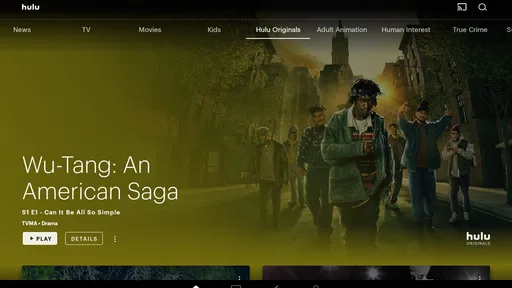
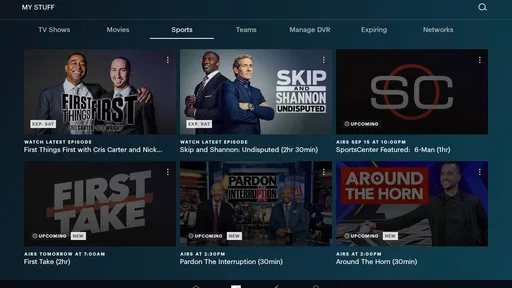
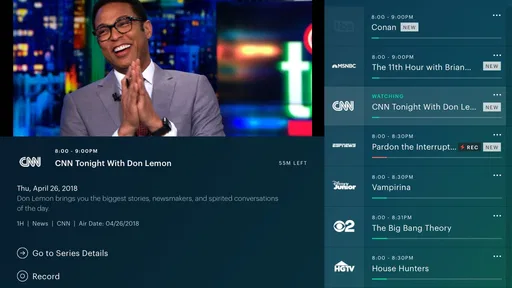
Once you’re in, it’s like unlocking a treasure chest of content. Hulu offers a mix of live TV, original series, and an extensive collection of movies and shows. From classics to the latest releases, there’s something for everyone. The integration of live TV is particularly impressive, making it a great choice for those who want to cut the cord but still enjoy live sports and news.
What really stands out is the selection of Hulu Originals. Shows like "The Handmaid’s Tale" and "Castle Rock" are exclusive to Hulu and have received rave reviews. If you’re into binge-watching, you’ll find yourself lost in these stories for hours.
Navigation and User Experience
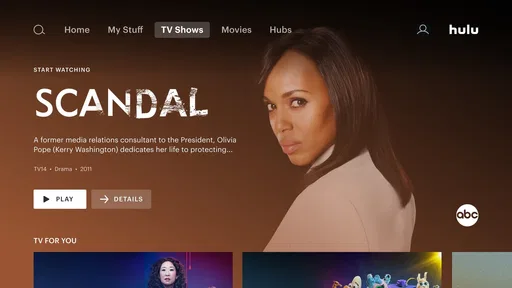
Navigating through the app is straightforward. The home screen is well-organized with categories like "Keep Watching," "Recommended for You," and "New This Month." This makes it easy to pick up where you left off or discover something fresh. The search function is robust, so whether you’re looking for a specific show or just browsing genres, you’ll find what you need without hassle.
The video quality is top-notch, offering HD and even 4K options for select content. Plus, the app supports multiple profiles, so each member of your household can have their personalized viewing experience without interfering with each other’s watchlists.
Subscription Plans
Now, let’s talk about the subscription plans because that’s always a biggie. Hulu offers several options depending on your needs. You can go for the basic plan with ads or splurge a little more for the ad-free experience. There’s also the Hulu + Live TV option, which includes over 75 live channels. It’s perfect for sports enthusiasts and news junkies.
If you’re a student, Hulu has a sweet deal that includes Spotify and Showtime for a bundled price. It’s worth checking out if you want to maximize your entertainment options without breaking the bank.
Because plan availability and terms can change, I’d check the current choices before signing up and compare the final price with what you already pay for entertainment. A bundle only saves money if you would otherwise use the included services; if not, it can be a more complicated way to spend. For a household that mainly wants on-demand series, a live-TV plan may also be more than it needs. I would choose based on actual viewing habits, not the most feature-packed option.
Little Quirks and Considerations
While Hulu is pretty awesome, no app is without its quirks. Occasionally, you might encounter buffering issues, especially if your internet connection isn’t super fast. But that’s pretty standard with most streaming services. A little patience usually does the trick.
Another thing to note is the regional restrictions. Some content might not be available in your area due to licensing agreements, so keep that in mind when browsing the library.
There is also a reasonable expectation to set around the rating and household use: the Teen label is a guide, not a substitute for checking whether a particular programme is right for everyone watching. I’d make the viewing choice before handing over the remote, especially when children or guests are in the room. And if a title is not available in your region, I would not keep searching through the same menus; checking another service for that particular title is a more practical response.
Final Thoughts
Overall, Hulu for Android TV is a solid choice for anyone looking to expand their entertainment horizons. With its diverse range of content and user-friendly interface, it’s no wonder Hulu has become a staple in many households. Whether you’re into live TV, movies, or exclusive series, there’s a lot to love about this app.
So, if you haven’t checked out Hulu for Android TV yet, I’d say it’s definitely worth a download. Grab some popcorn, settle into your comfy couch, and let Hulu take you on a journey through the world of entertainment. Happy streaming!
My recommendation is to start with the free install, confirm that your Android TV is compatible, and then decide whether the available subscription options fit the shows and viewing routine you actually have. Hulu has a low-friction way into its app, but not necessarily into every programme. That distinction makes the decision clearer: try it if its catalogue is a real draw, compare alternatives if you mainly want a different kind of service, and skip it if another monthly commitment would go unused.
The app has drawn around 8,600 ratings and 2,800 written reviews, with an average rating of 1.9, so I would not rely on a polished description alone when deciding whether it suits my setup. Those figures are a reminder to weigh your own needs and experience carefully, not a verdict on what will happen on every television. It has been installed over 10 million times, which shows it is widely used, but popularity does not remove the practical questions about price, compatibility and regional availability.
For me, the best reason to keep Hulu on the home screen is simple: I can name the kind of programme I want to watch and find that it belongs here. If I cannot name anything I’d choose, I would wait rather than subscribe out of habit. The app is free to download, its content is rated Teen, and the value of using it comes down to whether the available viewing earns a place in your routine.
Pros
- User-friendly interface for easy navigation.
- Wide variety of content across genres.
- Seamless integration with Android TV.
- High-quality streaming with minimal buffering.
- Customizable profiles for personalized experience.
Cons
- Advertisements in lower-tier subscriptions.
- Limited availability of some popular shows.
- Occasional app crashes reported by users.
- Requires stable internet for best performance.
- Some content restricted by regional licensing.
FAQs for Hulu for Android TV
What are the system requirements for Hulu on Android TV?
To run Hulu on Android TV, your device must have Android 5.0 (Lollipop) or later. Ensure you have a stable internet connection, ideally with a minimum speed of 3 Mbps for streaming standard definition content and 8 Mbps for live streams. Check for any available updates for optimal performance.
Does Hulu offer a free trial on Android TV?
Yes, Hulu typically offers a free trial period for new subscribers. The duration can vary, often ranging from one week to a month. During this period, you can explore Hulu’s content library and features. Remember to cancel before the trial ends if you decide not to continue, to avoid charges.
Can I download shows and movies for offline viewing on Android TV?
Currently, Hulu does not support downloading content for offline viewing on Android TV. This feature is available on mobile devices such as smartphones and tablets. For Android TV users, streaming is only possible while connected to the internet.
How do I resolve buffering issues while streaming on Hulu?
To reduce buffering on Hulu, ensure your internet connection meets the recommended speeds. Close any unnecessary apps running in the background on your Android TV. Restart your router and modem, and try reducing the streaming quality in Hulu’s settings if problems persist.
Is there a way to customize subtitles and audio settings on Hulu for Android TV?
Yes, you can customize subtitles and audio settings on Hulu for Android TV. While watching a video, use the remote to access the settings menu. Here, you can adjust subtitle language, font size, and audio track options to enhance your viewing experience.


